


isolved People Cloud
4.3719.00 Reviews
App Specs
- Version
- 52.20250212.3
- Updated On
- License
- Free
- Downloads
- 500,000+
- Developer
- Infinisource
- Categories
- Business
- Platform
- Android
Screenshots
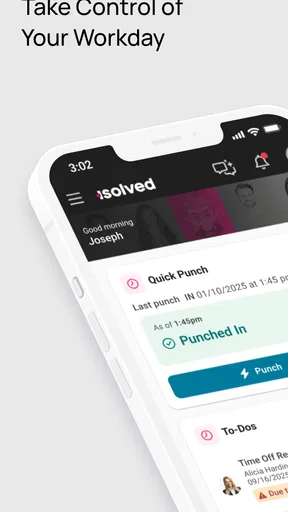
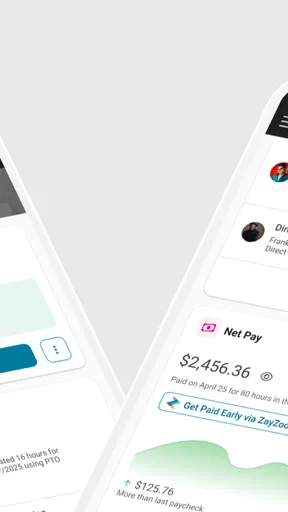
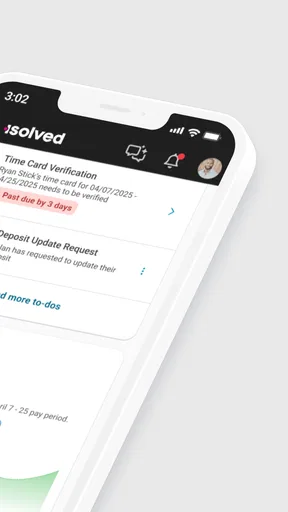
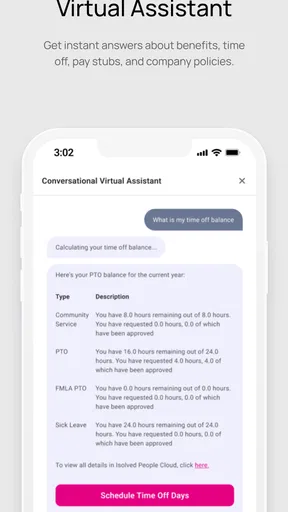
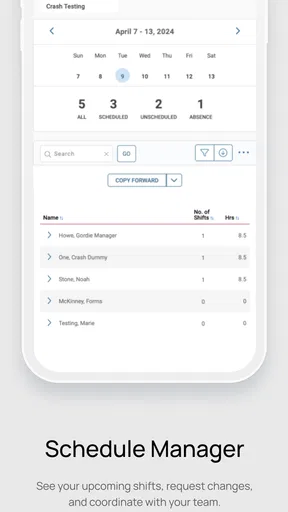
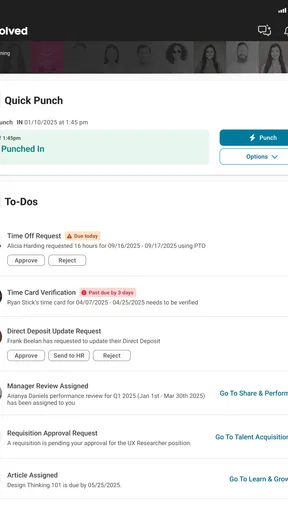
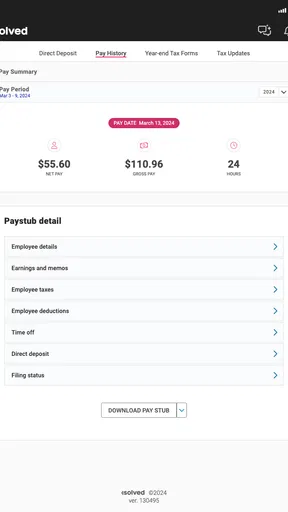
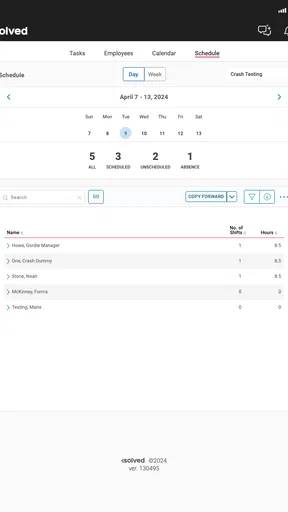
 Analysis by AppCompare
When I judge a mobile HR tool, I look beyond its feature list: can I get to a routine task quickly, does it remain usable when I’m switching between work and other things, and can I recover calmly if a page takes longer than expected? That is the lens I’d use for isolved People Cloud. It’s a business app from Infinisource, and its purpose is to put employee-related work within reach away from a desk. I see the strongest case for it when an employer already uses the wider isolved service and wants a mobile companion, rather than when someone is simply looking for a general-purpose work organizer.
What speed should you expect?
For an HR app, speed is less about flashy animation and more about the number of steps between opening the app and finding the information or task you need. The app’s focus is essential HR access, so the useful test is whether it fits into short moments: checking something before a shift, handling a quick work item during a break, or confirming a detail while away from a computer. I would treat it as a convenience layer for those moments, not assume that every substantial HR task will be faster on a phone than on a full web interface.
That distinction matters because HR workflows can involve precise details. A small screen is handy for a quick check, but it is less comfortable for reading long records, comparing several pieces of information, or entering a lot of text. My practical advice is to use mobile for the actions that genuinely benefit from being mobile, then move to a larger screen when a task calls for careful review. That is not a failing unique to this app; it is a sensible boundary for nearly any phone-based HR system.
Where busy moments can feel different
The app is most useful when work is fragmented. Picture a manager who is away from a desk, has a few minutes between conversations, and needs to deal with an employee-related task rather than leave it for later. Having an HR app at hand can reduce the mental backlog: instead of making a note to remember a work item, the manager can check whether it can be handled right then. For employees, the same general convenience can make a mobile route more practical than waiting until they are back at a shared or office computer.
Still, I would not recommend trying to process a complicated personnel matter while distracted or rushing. A phone can make access easier, but it cannot make a high-stakes decision less demanding. If the task involves reviewing several details or double-checking an entry, I’d choose a quieter moment and a larger screen where possible. The trade-off is straightforward: mobile access helps with timing, while careful work still benefits from focus.
Reliability and sensible recovery
For a work app, reliability is not only about whether it opens; it is also about whether I can keep my workflow clear when a connection or a busy day interrupts me. I’d approach isolved People Cloud as a route into an employer’s HR environment, not as a private notebook where I should compose lengthy work and assume it will be stored automatically. Before leaving a screen or switching to another task, I’d make sure an action has completed and that any important change is visible. That simple habit is useful with business apps generally, especially when the consequences of a mistaken entry matter.
Its average rating is 3.8 from around 1.6 thousand ratings, and it has more than 500 thousand installs. Those figures suggest that many people have tried it, but they don’t tell me how well it fits a particular employer’s setup or how every workflow behaves. I would judge reliability in the context of the tasks I actually need: whether I can sign in, reach the relevant area, and finish a routine action without confusion. If something does not load as expected, I’d avoid repeatedly submitting the same action; first check whether it already went through, then try again when the screen and connection are stable.
Worth Reading Before You Choose

EA SPORTS FC Mobile 26 Is a Bigger Football Game, but It Takes Time

Flipboard Shows What News Apps Must Do Beyond the Feed

Switching to Android Auto Means Rethinking Your Driving Routine

Google Calendar Makes a Crowded Week Easier to Manage

Ludo King Makes the Most of the Minutes Between Plans

Baby Panda World Brings Quick Play to Modern Phones, but Its Game Library Feels Busy
Device fit, version, and the limits of a phone
The app is free, rated for Everyone, and requires Android 6.0 or later. Its current version is 52.20250212.3, and it was released on October 3, 2023. Those details make it easier to decide whether an Android device is in the right range, but a compatible operating system alone does not guarantee that the experience will feel equally comfortable on every phone. Screen size, typing comfort, and the way someone uses their device all affect whether mobile HR feels convenient or cramped.
On a phone with limited screen space, I’d prioritize quick checks and straightforward actions rather than trying to review a full work history or carefully compare multiple records. If I rely on accessibility settings, a larger display, or a particular input method, I’d test the specific work routine I need before making the app my only route to HR tasks. And if the employer’s process is easier to handle on a computer, it is reasonable to keep using that option for detailed work. Mobile access should complement a dependable work routine, not force every task onto a smaller screen.
People who want a personal HR app independent of their employer should also be clear about the distinction: this is for accessing workplace HR functions, so its usefulness depends on the organization and the employee’s role. It is not a replacement for a general calendar, team chat, or task manager. If all I need is to coordinate shifts with colleagues, a dedicated scheduling or messaging tool may be simpler. If I need an employee-facing way into an employer’s HR services, this app is much more relevant.
The First Impression: Navigating the Cloud
When I first opened up isolved People Cloud, I was greeted by a clean and modern interface. I love how intuitive it is! You don’t need to be a tech wizard to navigate through its features, which is a huge plus in my book. Everything is neatly organized, and it feels like the app really understands the chaos of managing people. It’s like having a personal assistant who never takes a day off.
Features That Stand Out
Let’s get into the meat of it. What really sets this app apart are its robust features. You’ve got your HR management, payroll processing, time tracking, and benefits administration all under one roof. It’s like the Swiss Army knife for HR professionals.
- HR Management: From onboarding to performance, it handles it all with elegance. I found the onboarding process particularly streamlined, making it easy to get new hires up to speed.
- Payroll Processing: This feature is a lifesaver, ensuring that everyone gets paid accurately and on time. It’s like having a payroll expert in your pocket.
- Time Tracking: Forget the old punch cards; tracking hours is a breeze with this system. The time clock feature is user-friendly and integrates seamlessly with payroll.
- Benefits Administration: Managing benefits has never been easier. I was impressed with how effortlessly I could manage and track employee benefits.
Integration and Accessibility
One thing I must highlight is the app's ability to integrate with other systems. This makes it super versatile and adaptable to various business needs. Plus, it’s cloud-based, so you can access it from anywhere. Whether you’re at the office, at home, or on the go, your HR tasks are just a click away.
The mobile version of the app is equally impressive. I tested it on both iOS and Android, and it runs smoothly on both platforms. It’s nice to have the same great experience no matter what device you’re using.
User Experience and Support
The user experience is top-notch. The app is designed to be user-friendly, and I didn’t encounter any lag or crashes, which is always a relief. The support team is also worth mentioning. They’re quick to respond and genuinely helpful, which makes any issue feel like a minor bump in the road rather than a full-blown crisis.
In practical terms, I’d separate what I need from what my employer makes available. An employee checking a routine HR item has a different job from a manager handling a sensitive change, and the right workflow depends on the access and responsibilities assigned by the organization. Before relying on the app for an urgent deadline, I’d confirm that the relevant task is available to my account and that I know where its completion is reflected. That quick orientation can prevent a last-minute scramble.
Making it work in an everyday routine
A realistic use case is a supervisor reviewing a work item between meetings, then returning to a computer later for a more detailed review. The phone helps capture the convenient moment without turning that moment into a rushed decision. For an employee, a short check during a break may be easier than remembering to log in at home. In either case, I’d keep the mobile session focused: open the app with a specific task in mind, complete or verify that task, and then move on instead of treating the phone as a place to do every piece of HR administration.
One non-obvious tip is to use the mobile app as a prompt for follow-through, not as proof that a task is finished. When a work item matters, I’d check the resulting status or confirmation before closing the app. Another is to avoid mixing quick personal checks with complex changes in the same hurried session; doing the latter when focused makes it easier to spot a mistaken selection or incomplete step. These habits don’t add features, but they make a workplace tool safer and less frustrating to use.
Compared with a desktop HR portal, a mobile app wins on being close at hand and loses some comfort for detailed reading and data entry. Compared with email or a general chat tool, it is more appropriate for reaching an employer’s HR environment, while those communication tools remain better for discussing a question with a colleague. I would not replace a company’s official process with messages or personal notes just because they are faster to open. The best arrangement is usually to use the HR app for the official task and other tools only for coordination around it.
Another question I’d ask before depending on it is whether it suits the device I use every day. The minimum Android requirement is useful, but I’d still check basic comfort on my own screen: can I read the information without strain, enter details accurately, and move between the areas I need? If I share a device or work in a setting where I cannot comfortably check a phone, the app may be less useful in practice than a computer-based route. Convenience is personal, not just a matter of compatibility.
It also helps to be realistic about what “anywhere” means. Mobile access can make an HR task reachable outside a desk, but it does not remove the need for a suitable connection, the right account access, or enough time to complete the action carefully. If I’m in a hurry or the app behaves unexpectedly, I’d pause rather than tap through blindly. For a consequential change, I’d verify the result through the appropriate work channel before assuming everything is settled.
Who benefits most, and who may prefer another route?
I’d recommend this app most to employees and managers whose organization already uses isolved and who genuinely need to handle or check HR matters away from a computer. It is particularly relevant to people whose workday moves between locations, or who have only short windows to deal with routine employee-related tasks. Its business focus is a strength in that setting: it is meant to serve a workplace workflow, rather than compete with broad productivity apps.
I’d skip it if I wanted a standalone tool for personal payroll records, a universal time clock, or a way to manage a team without an employer’s HR system behind it. I’d also favor a desktop portal for extensive record review, and a dedicated scheduling or communication tool for coordinating day-to-day coverage. The app’s value depends on fit with the organization and the task; installing it alone cannot create that connection.
Final Thoughts: Is It Worth It?
In the end, isolved People Cloud is more than just an app; it’s a comprehensive solution for managing the entire lifecycle of your employees. It simplifies complex processes and makes everything more efficient. It’s perfect for businesses of all sizes, whether you’re a startup or a well-established company.
So, if you’re looking to bring some order to your HR chaos, give isolved People Cloud a try. It’s got the features, the flexibility, and the support you need to streamline your HR tasks and focus on what really matters – your people.
My bottom line is more specific: I see isolved People Cloud as a useful mobile companion when an employer’s HR setup already makes it part of the working day. I value the idea of handling a quick check without waiting for a desk, but I would keep a larger screen for involved work and verify important actions before moving on. The app is free, and its Everyone content rating makes its audience broad, yet neither point changes the main question: does your organization use it, and does your role need mobile access? If yes, it is worth trying for a few routine tasks and judging it on those real workflows. If not, a desktop HR portal or a tool designed for your specific job may be the more practical choice.
Pros
- User-friendly interface enhances productivity.
- Comprehensive HR tools in one platform.
- Seamless integration with third-party apps.
- Robust reporting and analytics capabilities.
- Regular updates with new features.
Cons
- Limited offline functionality.
- Customization options could be broader.
- Requires stable internet connection.
- Initial setup can be time-consuming.
- Mobile app lacks some desktop features.
FAQs for isolved People Cloud
What is isolved People Cloud and what are its main features?
isolved People Cloud is a comprehensive human capital management platform designed to streamline HR processes. It integrates payroll, benefits administration, talent management, and workforce management into a single solution. The platform is cloud-based, offering flexibility and accessibility from anywhere, making it ideal for businesses looking to enhance their HR operations with advanced automation and analytics.
How secure is the data on isolved People Cloud?
Security is a top priority for isolved People Cloud. The platform employs robust security measures, including data encryption, multi-factor authentication, and regular security audits to protect sensitive employee information. Additionally, isolved complies with industry standards and regulations, ensuring that user data is safeguarded against unauthorized access and breaches.
Can isolved People Cloud be customized to fit specific business needs?
Yes, isolved People Cloud offers a high degree of customization to meet the unique needs of different organizations. Users can tailor workflows, reports, and dashboards to align with their specific HR processes. The platform is scalable, accommodating businesses of various sizes and industries, which makes it a versatile solution for diverse HR requirements.
Is there customer support available for users of isolved People Cloud?
isolved provides comprehensive customer support for its users. This includes access to a dedicated support team, online resources, and training materials. Users can reach out for assistance through various channels such as phone, email, or live chat, ensuring that any issues or questions are addressed promptly and effectively.
What devices and operating systems are compatible with isolved People Cloud?
isolved People Cloud is a cloud-based platform accessible via any internet-enabled device, including desktops, laptops, tablets, and smartphones. It is compatible with major operating systems such as iOS, Android, Windows, and macOS, providing users with flexibility and convenience to manage HR tasks from virtually anywhere.


